Part of Kubernetes basics
Immutable ConfigMaps Explained Simply: Lock your Kubernetes settings
A ConfigMap stores application settings. An immutable ConfigMap locks those settings so nobody can edit them by accident. Build the idea step by step with one weather app, then try it yourself in a small lab.
A ConfigMap stores application settings. An immutable ConfigMap locks those settings so nobody can edit its data by accident.
We will build the idea step by step with one small example: a weather app. Part 1 explains the concepts. Part 2 is a hands-on lab you can run on any practice cluster.

Open the full diagram. Keep this picture in mind; every section below explains one part of it.
Part 1: Understand the concepts
1. Code and settings are different things
Imagine a weather application.
- Its code decides how to fetch and display the weather.
- Its settings decide which city to show and how often to refresh.
CITY=Kathmandu
REFRESH_SECONDS=60
If those values were written inside the code, changing the city would mean editing the code, rebuilding the container image, and releasing it again. That is a lot of work for one word.
A better design keeps the code the same and changes only the settings. The same image can then show Kathmandu in one environment and Pokhara in another. This idea is called separating configuration from code.
2. What is a ConfigMap?
A ConfigMap is a Kubernetes resource that holds non-secret settings as names and values. Each name is called a key.
apiVersion: v1
kind: ConfigMap
metadata:
  name: weather-settings
data:
  CITY: "Kathmandu"
  REFRESH_SECONDS: "60"
Read it like this:
| Line | Meaning |
|---|---|
apiVersion: v1 |
ConfigMaps belong to the core Kubernetes API, version v1. |
kind: ConfigMap |
This object is a ConfigMap, not a Pod or a Deployment. |
metadata.name |
The name other resources use to find it: weather-settings. |
data |
The settings, stored as key and value pairs. |
CITY: "Kathmandu" |
The key CITY has the value Kathmandu. |
REFRESH_SECONDS: "60" |
The key REFRESH_SECONDS has the value 60. |
Three details matter:
- Values in
dataare strings. Write"60"with quotes. Without quotes, YAML reads60as a number and Kubernetes rejects it. - A value can be a whole file. For example, a key named
app.confcan hold a complete configuration file. - A ConfigMap is small. Its total data is limited to 1 MiB. It is for settings, not for large files or databases.
The ConfigMap stores instructions; it does not run the application. Creating it starts nothing. It just waits until something reads it.
3. Containers, Pods, and Deployments
Your application runs inside a container. Kubernetes runs that container inside a Pod, the smallest unit Kubernetes schedules.
You rarely create Pods by hand. A Deployment stores the instructions for the Pods, called the Pod template, and keeps the requested number of Pods running. If a Pod crashes or is deleted, the Deployment creates a replacement from the same template.
Our weather Deployment says, in plain words:
“Run 3 Pods. Each Pod runs the
weather-appcontainer and receives its settings from the ConfigMap namedweather-settings-v1.”
The important part is “from the ConfigMap named …”. The Pod template refers to the ConfigMap by name. Remember this; it is the key to changing settings safely later.
4. How a Pod receives ConfigMap settings
A Pod can receive ConfigMap settings in two common ways.
Way 1: Environment variables. Each key becomes an environment variable when the container starts. The app reads CITY as $CITY.
containers:
  - name: weather-app
    image: example/weather-app:1.0
    envFrom:
      - configMapRef:
          name: weather-settings-v1
You can also pick one key at a time:
env:
  - name: CITY
    valueFrom:
      configMapKeyRef:
        name: weather-settings-v1
        key: CITY
Way 2: Mounted files. Each key becomes a file inside the container. The file name is the key, and the file content is the value.
containers:
  - name: weather-app
    image: example/weather-app:1.0
    volumeMounts:
      - name: settings
        mountPath: /etc/weather
volumes:
  - name: settings
    configMap:
      name: weather-settings-v1
The container now sees /etc/weather/CITY containing Kathmandu and /etc/weather/REFRESH_SECONDS containing 60. The volume chooses the ConfigMap, and the volumeMount chooses where its files appear. The matching name settings connects them.
The application must be written or configured to read those settings. If the app reads $TOWN but the ConfigMap provides CITY, nothing breaks loudly; the app just never sees your value. Kubernetes delivers settings. It cannot make an application understand an unfamiliar setting.
5. Namespaces: where everything lives
A Namespace is a named group of Kubernetes resources inside one cluster.
Think of a school:
| School | Kubernetes |
|---|---|
| The school building | The cluster |
| A classroom | A Namespace |
| A teacher who keeps the class running | A Deployment |
| The students doing the work | The Pods |
| The instruction sheet pinned on the wall | The ConfigMap |
| A laminated instruction sheet | An immutable ConfigMap |
Two rules follow:
- The same name can exist in different Namespaces.
weather-settings-v1indevandweather-settings-v1inprodare two separate objects. - A Pod can only use ConfigMaps from its own Namespace. A Pod in
devcannot read a ConfigMap inprod.
For example, a dev Namespace can contain both the weather Deployment and its ConfigMap, as in the first diagram.
6. Mutable: changeable settings
Mutable means changeable. A normal ConfigMap lets you update its stored settings:
Before: CITY=Kathmandu
After:  CITY=Pokhara
Here is the part that surprises beginners: saving a new value does not always change what a running application sees immediately. It depends on how the Pod receives the setting.
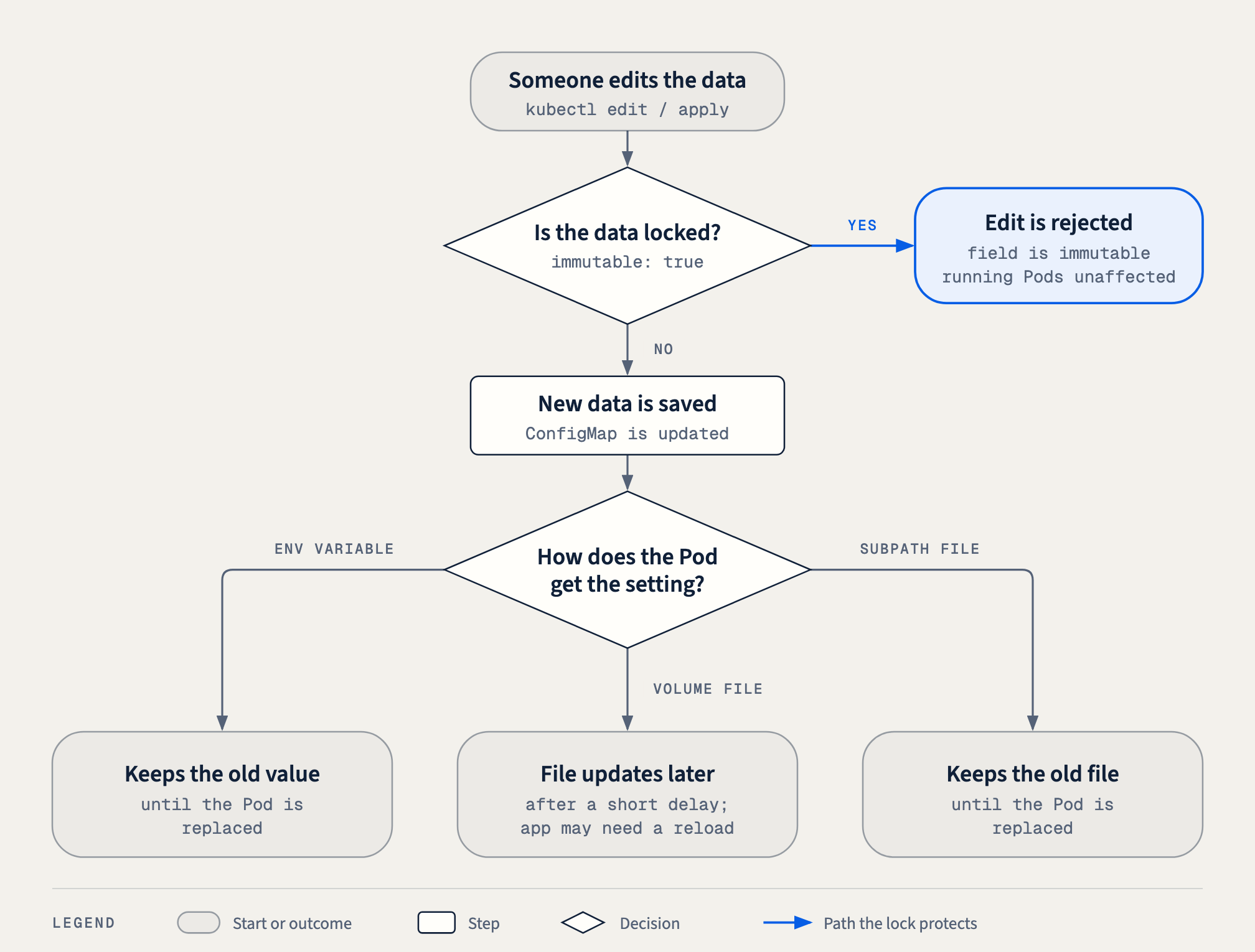
| How the Pod receives it | After you edit the ConfigMap | To use the new value |
|---|---|---|
| Environment variable | The running process keeps the old value. Environment variables are set only when a container starts. | Replace the Pods, for example with a rollout restart. |
| Normal mounted file | Kubernetes updates the file after a short delay, often up to about a minute. | The app must re-read the file. Some apps need a reload. |
subPath mounted file |
The file never updates in the running container. | Replace the Pods. |
So with a mutable ConfigMap, a change can arrive in some Pods, at different times, or not at all until restart. That makes mistakes harder to notice and harder to undo.
7. Immutable: locked settings
Immutable means the stored data is locked against changes.
Think of a sealed or laminated instruction sheet. You can read it, but you cannot rewrite its instructions.
apiVersion: v1
kind: ConfigMap
metadata:
  name: weather-settings-v1
immutable: true
data:
  CITY: "Kathmandu"
  REFRESH_SECONDS: "60"
The important line is:
immutable: trueNotice where it sits: at the top level, next to data, not inside metadata or data.
After locking it:
- You cannot change its stored settings. Edits to
dataandbinaryDataare rejected. - You cannot unlock it by setting
immutable: false. The lock is one-way. - You can still delete the ConfigMap if you have permission.
- Its labels and annotations can still change, because they are in
metadata, not in the locked data.
If someone tries to edit the data, the Kubernetes API server rejects the request with an error like this:
The ConfigMap "weather-settings-v1" is invalid: data: Forbidden: field is immutable when `immutable` is setImmutable means the data cannot be edited; it does not mean the resource cannot be deleted. Locking protects against careless edits, not against someone who is allowed to delete objects.
You can also lock an existing mutable ConfigMap after checking its values:
kubectl patch configmap weather-settings-v1 -n dev \
  --type=merge -p '{"immutable":true}'
8. Why lock settings at all?
Imagine three weather Pods using the same settings. Someone means to edit a different object but accidentally changes:
REFRESH_SECONDS=60to:
REFRESH_SECONDS=1If the application picks up that change, every Pod now refreshes 60 times more often. That could send far more requests to the weather service, increase load, hit rate limits, or raise your bill. Worse, with mounted files the change spreads quietly over the next minute, and nobody approved it.
An immutable ConfigMap blocks that data edit. Changing a setting becomes a deliberate act: write a new version, review it, and roll it out on purpose.
There is a second, quieter benefit: performance. The kubelet, the agent on each node, normally watches every ConfigMap that its Pods use in case it changes. For immutable ConfigMaps it can stop watching, because they can never change. In a large cluster with thousands of Pods, that noticeably reduces load on the API server.
The limitation: immutability locks incorrect settings too. If you lock REFRESH_SECONDS: "1", it stays wrong. Check the values before you release them.
9. Changing locked settings: create a new version
You cannot edit weather-settings-v1. So how do you move the app to Pokhara?
Create a new ConfigMap with a new name:
apiVersion: v1
kind: ConfigMap
metadata:
  name: weather-settings-v2
immutable: true
data:
  CITY: "Pokhara"
  REFRESH_SECONDS: "60"
Then update the Deployment’s Pod template so it refers to weather-settings-v2 instead of weather-settings-v1.
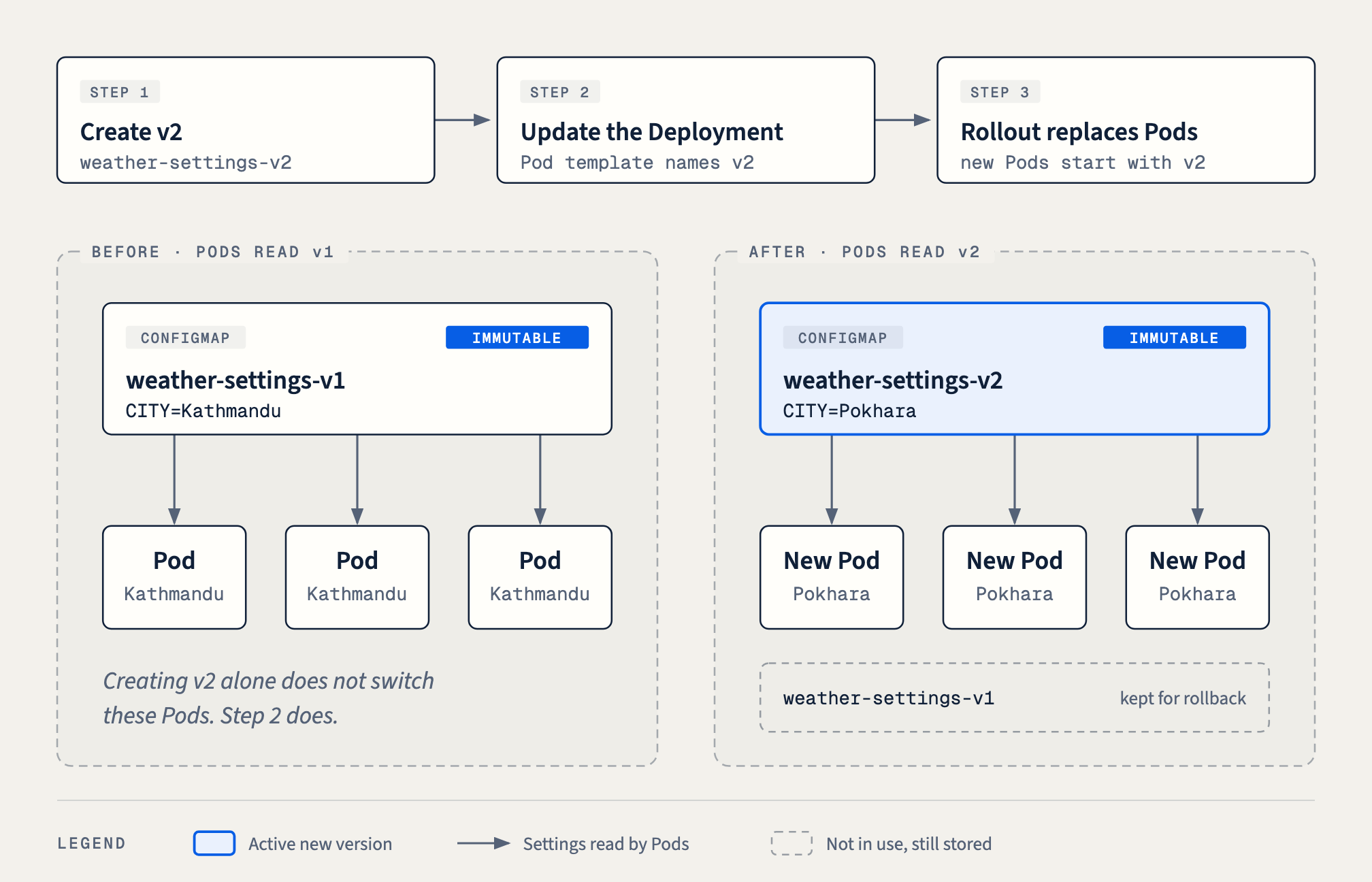
The sequence is:
- Create the new instruction sheet:
weather-settings-v2. - Update the Deployment to use it. Change the ConfigMap name in its Pod template.
- The Deployment rolls out replacement Pods that start with the new settings. Old Pods are removed gradually, so the app stays available.
Two points are easy to miss:
- Creating v2 alone does not switch existing Pods to it. Nothing refers to v2 until you change the Pod template. Step 2 is the switch.
- Changing the Pod template is what triggers the rollout. Editing only a ConfigMap never changes the template, which is why a mutable ConfigMap edit does not roll out new Pods on its own.
Keep v1 available if you might need to roll back. kubectl rollout undo restores the previous Pod template, which still says weather-settings-v1. That only works if v1 still exists. Delete old versions only after you are sure you will not need them.
This “new name for every change” pattern is common in real projects. Tools such as Kustomize’s configMapGenerator add a content hash to the name, like weather-settings-7k2f9h. A new value produces a new name, and the Deployment is updated automatically.
10. Immutable is not secret
An immutable ConfigMap protects settings from edits; it does not hide them. Anyone who can read ConfigMaps in that Namespace can read every value, locked or not.
Do not put passwords, API keys, or tokens in a ConfigMap. Use a Secret for those.
A Kubernetes Secret also needs appropriate permissions and protection:
- Secret values are only base64-encoded, which is not encryption. Anyone can decode them.
- Limit who can read Secrets with RBAC permissions.
- Enable encryption at rest for Secrets in the cluster’s datastore where possible.
Secrets support immutable: true too, with the same rules and the same benefits.
11. Common mistakes
| Mistake | What happens | Fix |
|---|---|---|
Putting immutable: true inside metadata or data |
The ConfigMap is not locked, or the YAML is rejected. | Place immutable at the top level, next to data. |
Writing REFRESH_SECONDS: 60 without quotes |
The ConfigMap is rejected because the value is not a string. | Write "60". |
| Creating v2 and expecting Pods to change | Pods keep reading v1. | Update the Deployment’s Pod template to name v2. |
| Deleting v1 immediately after the rollout | kubectl rollout undo brings back Pods that cannot find v1. |
Keep v1 until v2 is proven. |
| Locking values without checking them | Wrong values are locked, too. | Review and test before locking. |
| Storing passwords in a ConfigMap | Anyone with read access sees them. | Use a Secret with proper permissions. |
| ConfigMap in a different Namespace from the Pod | The Pod fails to start with a missing ConfigMap error. | Create the ConfigMap in the Pod’s Namespace. |
Part 2: Try it yourself
You need a practice cluster, such as kind, minikube, or a lab environment, and kubectl. The lab uses a tiny busybox container that prints its settings, so you can watch what it sees.
Step 1: Create the Namespace
kubectl create namespace devStep 2: Create the locked v1 settings
Save as settings-v1.yaml:
apiVersion: v1
kind: ConfigMap
metadata:
  name: weather-settings-v1
  namespace: dev
immutable: true
data:
  CITY: "Kathmandu"
  REFRESH_SECONDS: "60"
kubectl apply -f settings-v1.yaml
kubectl get configmap weather-settings-v1 -n dev -o jsonpath='{.immutable}{"\n"}'Expected output: true.
Step 3: Create the Deployment
Save as weather.yaml. It delivers the settings both ways: as environment variables and as files.
apiVersion: apps/v1
kind: Deployment
metadata:
  name: weather
  namespace: dev
spec:
  replicas: 3
  selector:
    matchLabels:
      app: weather
  template:
    metadata:
      labels:
        app: weather
    spec:
      containers:
        - name: weather-app
          image: busybox:1.36
          command: ["sh", "-c"]
          args:
            - |
              trap 'exit 0' TERM
              while true; do
                echo "env CITY=$CITY, file CITY=$(cat /etc/weather/CITY)"
                sleep 5
              done
          envFrom:
            - configMapRef:
                name: weather-settings-v1
          volumeMounts:
            - name: settings
              mountPath: /etc/weather
      volumes:
        - name: settings
          configMap:
            name: weather-settings-v1
kubectl apply -f weather.yaml
kubectl rollout status deployment/weather -n dev
kubectl logs deployment/weather -n dev --tail=2Expected output: env CITY=Kathmandu, file CITY=Kathmandu.
Step 4: Try to edit the locked data
kubectl patch configmap weather-settings-v1 -n dev \
  --type=merge -p '{"data":{"REFRESH_SECONDS":"1"}}'
The API server rejects it with Forbidden: field is immutable when immutable is set. Try unlocking it too:
kubectl patch configmap weather-settings-v1 -n dev \
  --type=merge -p '{"immutable":false}'
Also rejected. The lock is one-way. The Pods never noticed either attempt.
Step 5: Release v2 the safe way
Save as settings-v2.yaml:
apiVersion: v1
kind: ConfigMap
metadata:
  name: weather-settings-v2
  namespace: dev
immutable: true
data:
  CITY: "Pokhara"
  REFRESH_SECONDS: "60"
kubectl apply -f settings-v2.yaml
kubectl logs deployment/weather -n dev --tail=1Still Kathmandu. Creating v2 alone changed nothing.
Now point the Deployment at v2. In weather.yaml, change both weather-settings-v1 references to weather-settings-v2, then apply:
sed -i.bak 's/weather-settings-v1/weather-settings-v2/g' weather.yaml
kubectl apply -f weather.yaml
kubectl rollout status deployment/weather -n dev
kubectl logs deployment/weather -n dev --tail=1
Expected output: env CITY=Pokhara, file CITY=Pokhara. The Pod template changed, so the Deployment rolled out new Pods.
Step 6: Roll back
kubectl rollout undo deployment/weather -n dev
kubectl rollout status deployment/weather -n dev
kubectl logs deployment/weather -n dev --tail=1
Back to Kathmandu. This worked only because weather-settings-v1 still exists.
kubectl rollout history deployment/weather -n dev
kubectl get configmaps -n dev
Step 7: Clean up
kubectl delete namespace devDeleting the Namespace removes everything inside it, including the immutable ConfigMaps. Locked data can still be deleted.
Quick revision
ConfigMap            → stores non-secret settings as key/value strings
Env variable         → read at container start; replace Pods to update
Mounted file         → updates after a delay; app may need to reload
immutable: true      → data locked; cannot unlock; can still delete
Change locked data   → new ConfigMap (v2) + update Pod template → rollout
Rollback             → keep v1; rollout undo points back to it
Passwords            → Secret, not ConfigMap; immutable ≠ hidden
Remember these four ideas:
Namespace groups. Deployment manages Pods. ConfigMap stores settings. Immutable locks the data.
For a hands-on practice task with NGINX, mounted files, reloads, and TLS, read ConfigMaps, NGINX, and TLS: CKA practice guide.