Part of the series Learning AI agents
Google Gemini Enterprise Agent Platform: My first look inside the console
Opening the Agent Platform console helped me connect the pieces: models, tools, authentication, and the work needed to run an AI agent responsibly. Here is a beginner-friendly walkthrough of what the screens show and how I would approach a first project.
An AI demo can look simple: type a question and receive an answer. Building something a team can use every day raises more questions. What information can it read? Which actions can it take? How do we know it completed the task correctly?
While exploring Google Cloud, I opened Gemini Enterprise Agent Platform. The console screenshots in this post show that starting point: finding the platform, looking around the overview, and choosing an authentication method.
This is a first look at the interface and the ideas behind it. The screenshots show onboarding, rather than a completed agent deployment. The console images below are AI-edited versions of my screenshots, with project, account, and billing details concealed. Minor visual differences may remain from the editing process.
What is Gemini Enterprise Agent Platform?
Google introduced Gemini Enterprise Agent Platform on April 22, 2026, as the evolution of Vertex AI. Its purpose is to bring agent development and operations together around four areas: Build, Scale, Govern, and Optimize. Google also distinguishes the development platform from the Gemini Enterprise app, through which employees can use agents. See Google’s launch announcement.
Official announcement graphic from Google Cloud, corresponding to the announcement in my third screenshot. Image credit: Google Cloud; linked announcement above.
For me, the useful question is how these pieces help with a real task. A model can generate an answer, but a business workflow also needs data access, permissions, tools, and a way to check the result.
A model, a chatbot, and an agent
These terms describe different parts of a system:
| Term | Role | Example |
|---|---|---|
| Model | Produces outputs from inputs | Summarises a support ticket |
| Chatbot | Provides a conversational interface | Answers a customer’s question |
| Agent | Uses a model and allowed tools to work toward a goal | Looks up an order, checks a policy, and prepares a support response |
A chatbot can contain an agent. The chat window is only the interface; the decisions and tool calls happen behind it.
Imagine a customer asks, “Where is my order?” A useful workflow might verify the customer, retrieve the order, look up the delivery status, and explain the result. If the order cannot be found, the system needs a clear next step instead of inventing a delivery date.
That example is an illustration of an agent workflow, not something demonstrated by these screenshots.
Finding Agent Platform in Google Cloud
My first screenshot shows the Google Cloud navigation menu with Agent Platform expanded.
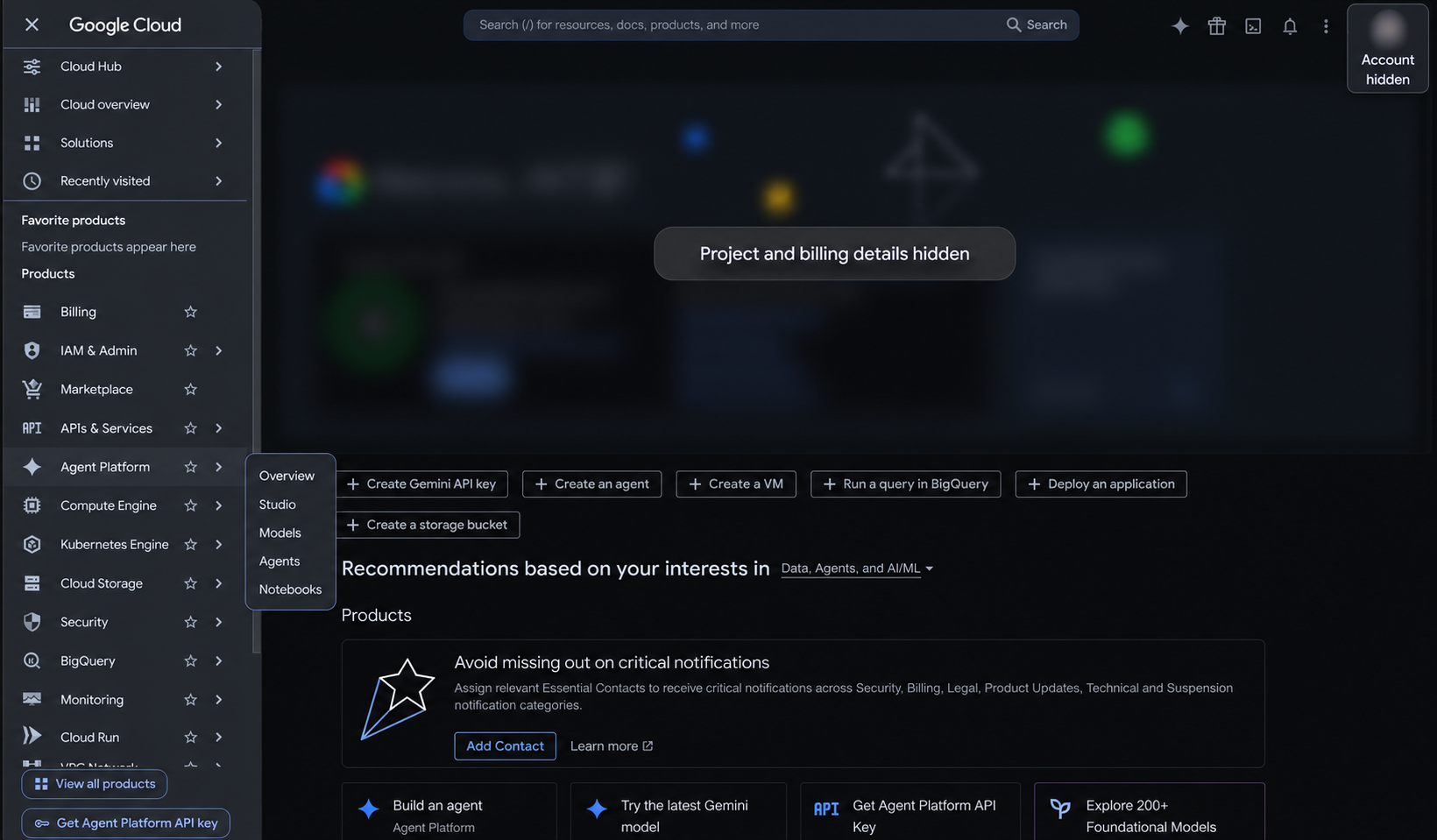
AI-edited version of my navigation screenshot. The relevant menu stays visible while project, account, and billing information is concealed.
The submenu provides a useful map of the workspace:
| Menu | What I would use it for |
|---|---|
| Overview | Start with onboarding and platform resources |
| Studio | Explore visual development and prototyping |
| Models | Review model options for a task |
| Agents | Explore agent development and management |
| Notebooks | Work through experiments in a code-based environment |
Google’s platform overview explains these development paths, including Agent Studio, the Agent Development Kit (ADK), and notebooks.
My approach would be to start with one task and choose the development path around it. A visual prototype can help clarify a workflow; code becomes useful when I need custom tools and explicit application logic.
Inside the overview screen
The second screenshot shows the welcome page and the onboarding panel.
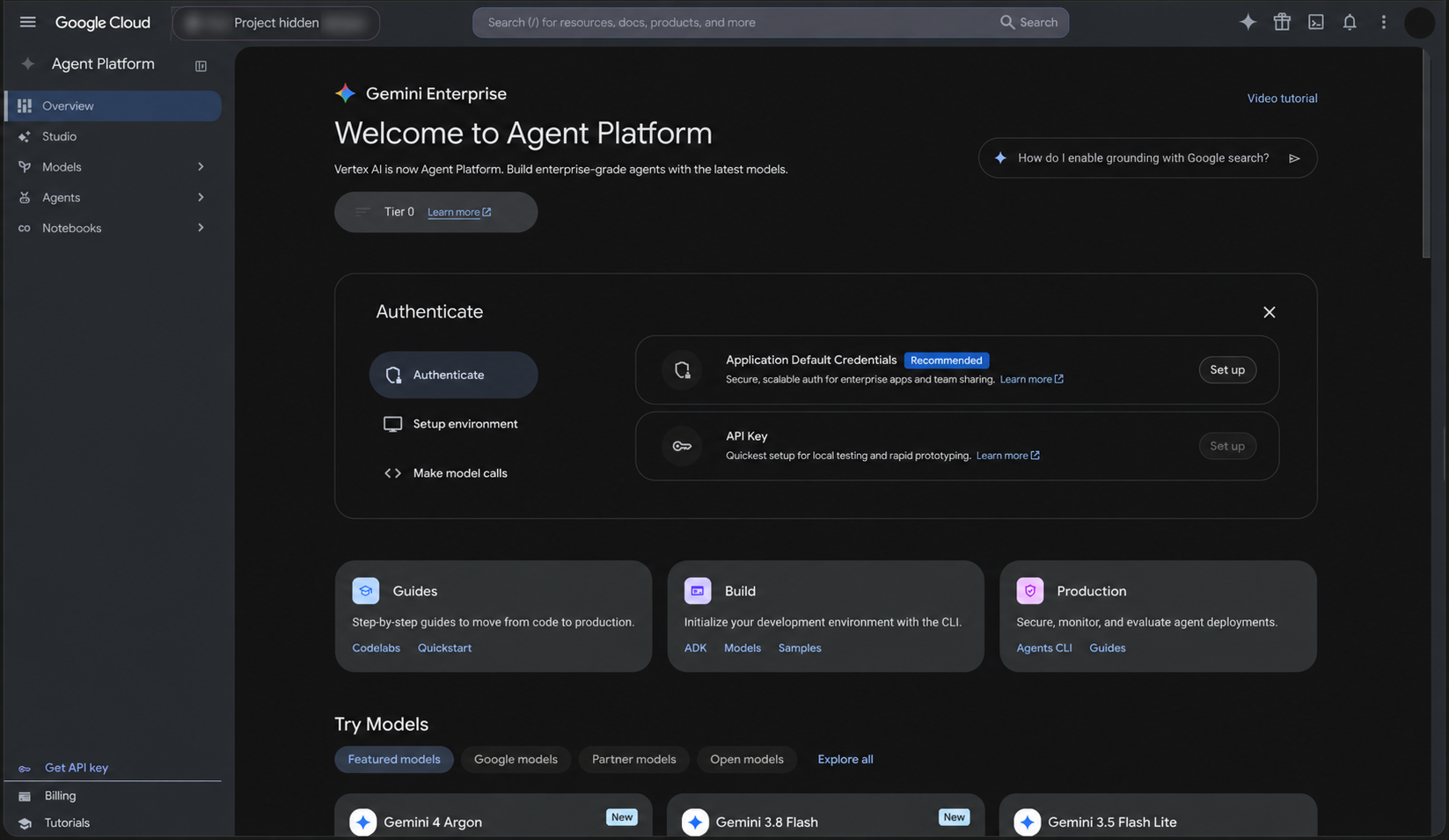
AI-edited version of my overview screenshot. This captures the onboarding interface; it does not establish that authentication or deployment has been completed.
The panel breaks the start into three steps:
- Authenticate — establish the identity used to access services.
- Setup environment — prepare the development environment.
- Make model calls — try an interaction with a model.
Below it are Guides, Build, and Production resource cards. I like this progression because it gives me a place to begin while keeping the later operational work visible.
The model cards lower on the page are a snapshot of the console at capture time. I would check current availability, region support, and cost before selecting a model for a project.
Authentication: ADC or an API key?
The screenshot presents two choices: Application Default Credentials (ADC) and an API key. Google’s authentication guide recommends API keys for testing and ADC for production.
ADC is a mechanism that client libraries use to find credentials for the environment where code runs. For local development, Google’s documentation describes:
gcloud auth application-default loginThis provides credentials for local application libraries. The CLI’s own authentication is separate, as explained in Google’s ADC setup guide.
Authentication answers who is making the request. Permissions determine what that identity may do. Successfully signing in does not automatically grant access to every model, dataset, or tool.
For a first project, I would verify access with one small request before adding business data or tools. For a deployed application, I would follow the credential setup for its hosting environment rather than copy local credentials into the deployment.
Understanding Build, Scale, Govern, and Optimize
The four pillars help me organise the questions I would ask about a project:
| Pillar | My practical question |
|---|---|
| Build | What task should the agent complete, and what tools does it need? |
| Scale | Where will it run, and how will it handle sessions and demand? |
| Govern | Which data and actions should it be allowed to access? |
| Optimize | How will I measure failures and improve its behaviour? |
Google documents development tools, managed runtime capabilities, identity and governance controls, evaluation, and observability under these pillars. The platform documentation is the place to check the capabilities relevant to a particular implementation.
These questions also expose gaps in a demo. An agent that answers one question successfully may still fail when a tool times out, a user lacks permission, or the source data is incomplete.
A first project I would build
I would start with a read-only support assistant for a small set of approved help documents.
Its goal would be specific: find relevant documentation, explain the answer, and link to the source. If the documents do not contain an answer, it should say so and suggest contacting support.
My build sequence would be:
- Write a few representative support questions and expected answers.
- Prepare a small collection of approved documents.
- Connect a retrieval tool with read-only access.
- Ask the agent to ground its answer in retrieved material.
- Test missing answers, conflicting documents, and unavailable tools.
- Review accuracy, response time, and cost before expanding access.
I would also test a document containing instructions such as “ignore your rules.” Retrieved material should supply information, not override the application’s instructions.
A useful result needs more than a fluent paragraph. I want to know whether the source supports the answer and whether the assistant recognises the limits of its information.
What I took away from this first look
The console makes the starting path visible: find the workspace, establish authentication, prepare an environment, and make an initial model call. The larger challenge is deciding what useful work an agent should do and how to verify it.
My next step would be a small, measurable workflow with limited data access. Once that works reliably, I can make an informed decision about adding more tools or allowing actions that change business systems.
For now, these screenshots mark the beginning of that learning process: exploring the platform and understanding the responsibilities that come with building an enterprise AI agent.