Part of the series Kubernetes networking
Kubernetes Gateway API explained: diagrams and YAML
How does https://app.example.com reach an NGINX Pod inside Kubernetes? The answer gets easier to follow when you separate the configuration from the traffic.
This walkthrough uses three diagrams and a YAML example to explain Kubernetes Gateway API. The example connects one HTTPS listener to three NGINX replicas through a Service named web-service.
This is a configuration walkthrough, not a report of a live cluster test. The manifest needs a Gateway API implementation, a certificate, and environment-specific settings before it can serve traffic.
What is Kubernetes Gateway API?
Gateway API is a set of Kubernetes APIs for configuring application networking. For this example, the three resources to understand are GatewayClass, Gateway, and HTTPRoute.
They describe which implementation manages the entry point, which connections it accepts, and where requests should go. A controller reads that configuration and programs a data plane, such as a proxy, that handles the traffic.
Think of two separate flows:
Configuration: GatewayClass + Gateway + HTTPRoute → controller → proxy configuration
Traffic:       browser → external load balancer → proxy → application backend
The controller’s reconciliation work belongs to the configuration flow. User requests pass through the configured data plane.
The request path at a glance
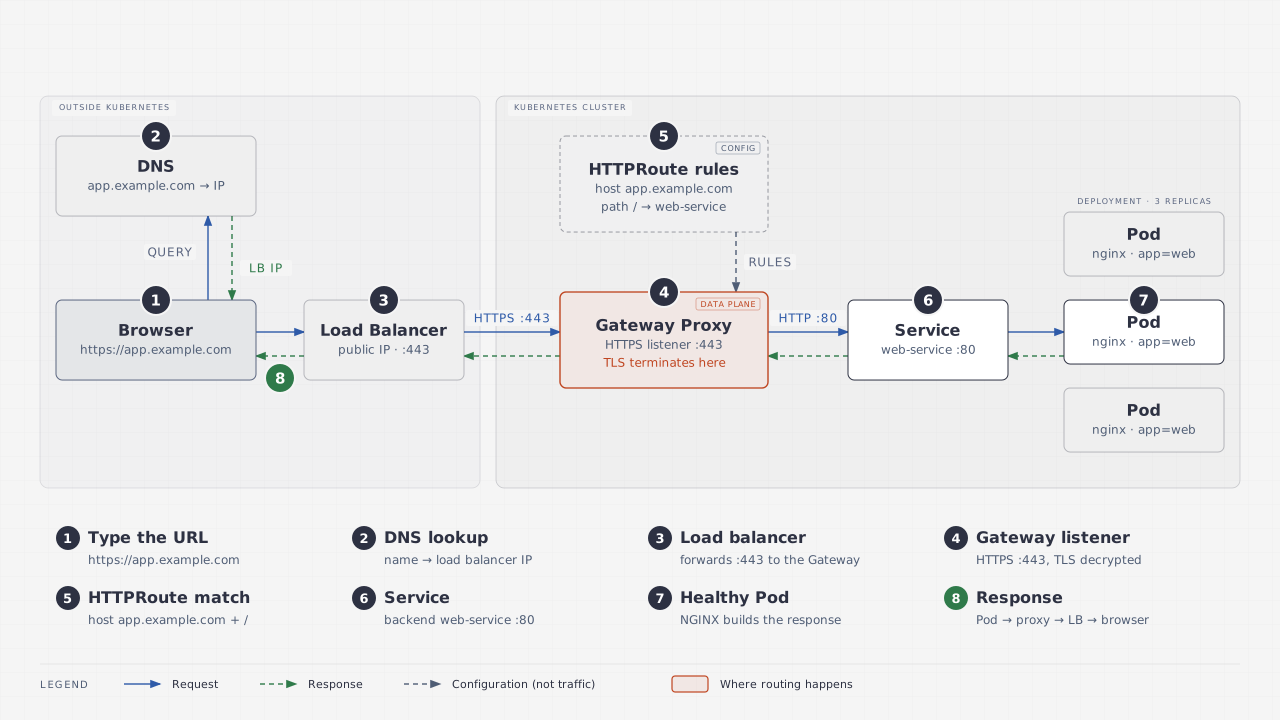
Open the overview diagram at full size.
In this topology, DNS resolves app.example.com to the external load balancer’s address. The browser connects to that address, and the load balancer forwards the connection to the Gateway proxy.
DNS is a lookup step. The HTTP request does not travel through the DNS server.
The diagram shows a common deployment pattern. Your Gateway implementation determines how its data plane is exposed; a separate external load balancer is not a requirement for every installation.
GatewayClass, Gateway, and HTTPRoute: what each does
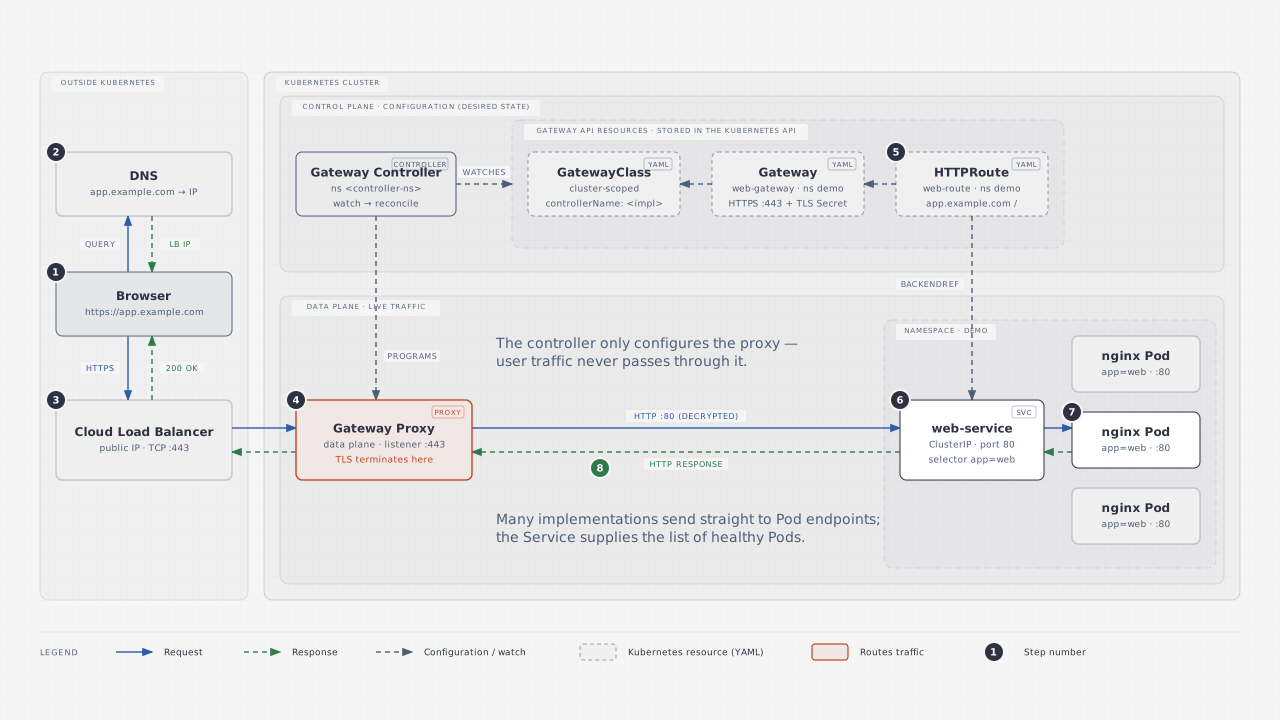
Open the architecture diagram at full size.
| Component | Job in this example |
|---|---|
GatewayClass |
Identifies the controller responsible for this class of Gateways. It is cluster-scoped. |
Gateway |
Defines the HTTPS listener on port 443, hostname, and certificate reference. |
HTTPRoute |
Attaches routing rules to the listener and references web-service:80. |
| Gateway controller | Reconciles the configuration into the implementation’s data plane. |
Service |
Provides the backend name and port, selecting Pods with app: web. |
Deployment and Pods |
Maintain three NGINX replicas that serve the response. |
An HTTPRoute is an API object containing rules. The proxy applies those rules; the route itself is not another network hop.
The key references in the manifest are:
Gateway.gatewayClassName → GatewayClass
HTTPRoute.parentRefs    → Gateway listener
HTTPRoute.backendRefs   → Service port
Service.selector       → matching Pods
One HTTPS request, step by step
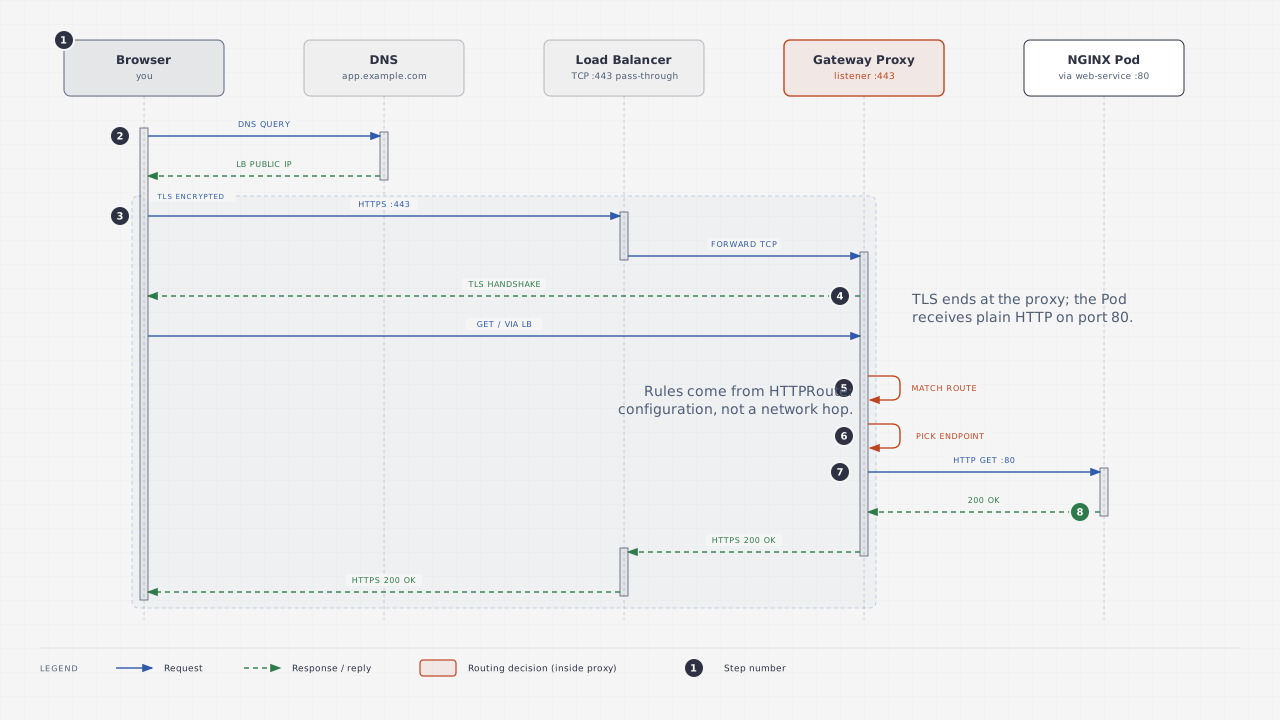
Open the sequence diagram at full size.
- Resolve the hostname. The browser obtains the address for
app.example.comfrom DNS, or uses a cached answer. - Connect to the entry point. In the illustrated setup, the external load balancer forwards TCP traffic on port
443to the proxy. - Complete TLS. The proxy uses the certificate referenced by the Gateway listener to establish HTTPS with the browser.
- Match the request. The proxy applies the attached HTTPRoute’s hostname and path rules.
- Choose a backend. The matching rule references
web-serviceon Service port80. - Reach an application Pod. The implementation forwards to a suitable backend endpoint. It may use Pod endpoints directly or the Service forwarding path.
- Return the response. NGINX responds to the proxy, which sends the response over the browser’s encrypted connection.
The Service in the diagrams describes the backend relationship. It does not imply that every implementation sends packets through the Service’s ClusterIP.
Where does TLS terminate?
The example terminates TLS at the Gateway proxy:
Browser ── HTTPS ──> Gateway proxy ── HTTP ──> NGINX PodThe listener uses protocol: HTTPS, tls.mode: Terminate, and a Secret named web-tls. The backend in this manifest serves plain HTTP on port 80.
Client-side and backend-side TLS are configured independently. Encrypting the upstream connection requires additional configuration supported by your implementation, such as BackendTLSPolicy. See the official Gateway API TLS guide.
Understand the HTTPRoute YAML
This is the routing portion of the supplied example:
apiVersion: gateway.networking.k8s.io/v1
kind: HTTPRoute
metadata:
  name: web-route
  namespace: demo
spec:
  parentRefs:
    - name: web-gateway
      sectionName: https
  hostnames:
    - app.example.com
  rules:
    - matches:
        - path:
            type: PathPrefix
            value: /
      backendRefs:
        - name: web-service
          port: 80
parentRefs attaches the route to the https listener on web-gateway. hostnames limits it to app.example.com, and the / path prefix covers paths under that host. backendRefs.port names the Service port, which is 80 here. The official HTTP routing guide explains these relationships.
All namespaced objects in this example live in demo. The Gateway listener allows routes from its own namespace.
Prepare and apply the complete example
Download the complete Gateway API YAML example. It contains the Namespace, GatewayClass, Gateway, HTTPRoute, Deployment, and Service.
Before applying it:
- Install Gateway API CRDs compatible with your chosen implementation, following its installation guide.
- Install and configure that implementation’s controller and data plane.
- Replace
example.com/gateway-controllerwith the controller’s exact identifier. If the implementation already provides a GatewayClass, use that class in the Gateway and remove the example GatewayClass object. - Replace
app.example.comwith a hostname you control, in both the Gateway and HTTPRoute. Obtain a certificate for that hostname. - Review the supplied
nginx:1.27image tag and choose a maintained version appropriate for your environment.
Create the namespace and TLS Secret using your actual certificate files:
kubectl create namespace demo --dry-run=client -o yaml | kubectl apply -f -
kubectl create secret tls web-tls -n demo \
  --cert=app.example.com.crt \
  --key=app.example.com.key
Keep the private key out of Git. The download contains a Secret reference, not certificate material.
Once you have edited the downloaded file:
kubectl apply -f gateway-api-example.yaml
kubectl get gateway web-gateway -n demo -o yaml
Use the assigned Gateway address to configure DNS for your hostname. Address provisioning and DNS records depend on your environment. Applying the manifest alone does not install a controller, obtain a certificate, or create public DNS records.
Troubleshoot from the Gateway to the Pods
Start by checking whether the implementation accepted the configuration:
kubectl get gatewayclass
kubectl describe gateway web-gateway -n demo
kubectl describe httproute web-route -n demo
Inspect condition reasons and messages, including GatewayClass acceptance, Gateway programming, and the HTTPRoute parent’s Accepted and ResolvedRefs conditions. A missing controller, rejected listener, or unresolved backend reference needs attention before testing the browser path.
Next, check the application backend:
kubectl get deployment,svc,pods -n demo
kubectl get endpointslices -n demo \
  -l kubernetes.io/service-name=web-service
kubectl describe pods -n demo -l app=web
The Service selector must match the Pod labels. Check readiness and the EndpointSlice conditions if there are no usable backends. The Kubernetes Service documentation explains selectors, ports, and endpoint discovery.
Finally, test your configured hostname:
# Replace this example hostname with your own.
curl -v https://app.example.com/| Symptom | First things to inspect |
|---|---|
| Hostname does not resolve | DNS records and the Gateway’s assigned address. |
| Connection times out | External exposure, firewall rules, listener, and data-plane availability. |
| Certificate validation fails | Certificate hostname, validity, trust chain, and listener Secret reference. |
| Request reaches the proxy but no route matches | Listener attachment, route acceptance, hostname, and path. |
| Proxy reports an upstream error | Service reference, port, ready endpoints, and network connectivity. |
These checks narrow down the problem; exact response codes and error messages vary by implementation.
What to remember
Use GatewayClass to identify the implementation, Gateway to define the entry point, and HTTPRoute to describe request routing. Then follow the backend reference through the Service to the Pods.
Keep the configuration flow separate from the packet path. That distinction makes the diagrams easier to read and gives you a practical order for debugging.
For the application side of the path, read What is a Kubernetes Pod, really?.